
World Debit MasterCard payment card
The World Debit MasterCard payment card is a convenient and reliable way to always keep your money at hand.
You can order a card, select the colour of the card, and manage your accounts in the Paysera Super App. If you use your card when you shop online, the app can also help you secure your card details by requesting order confirmation.
The World Debit MasterCard card can also be added to Google Pay.



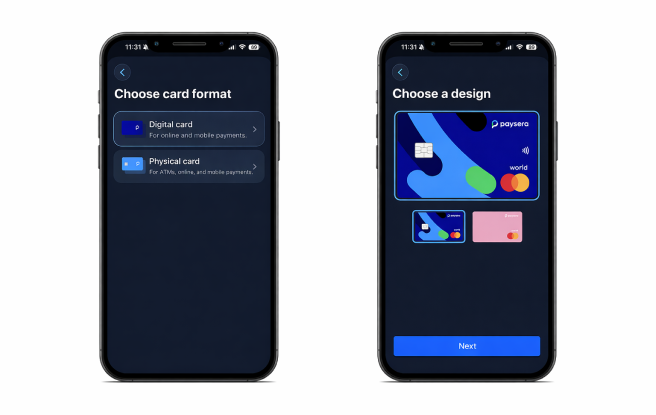
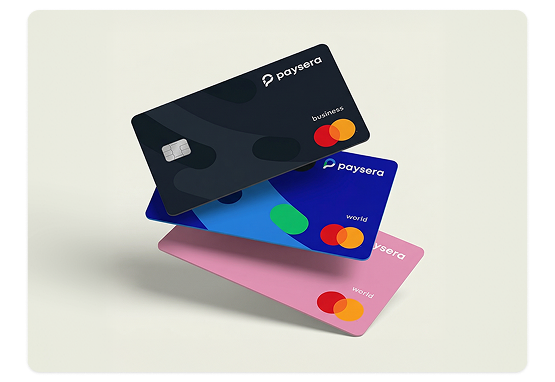
Vibrant World Debit MasterCard for daily expenses
Choose between a dark blue and pink design. Find your card in your wallet in no time!
Log in to your Paysera account and check which card designs are available.
Atsiskaitykite greitai ir šiuolaikiškai

Ordering a card
All Paysera Kosova clients who have completed the identification process and reached the age of 16, can order a World Debit MasterCard. One person can order up to 20 additional cards. You can quickly and easily order a card by logging in to the Paysera online banking or Super App. Please note that online card purchases must be confirmed in the Paysera Super App.

Account management by phone
By logging in to the Paysera Super App you will be able not only to check your card account balance, but also to download account statements, perform transfers to other banks, and to instantly send money from your main account to your card account and vice versa. If required, you will be able to verify your PIN code in the app or freeze your card if you lose it.

Contactless payments
In order to make small payments in stores – simply tap the card to the reader and cover your expenses without needing to enter the PIN code. For even greater convenience, add your World Debit MasterCard to Google Pay and simply pay with your phone.

Cash transactions
Cash-out with World Debit MasterCard is available worldwide – at all ATMs that service World Debit MasterCard. When cashing out in euro, select cash-out without conversion – this way you will avoid paying additional fees. The card's currency is euro, however, you can also make payments and withdraw cash in other currencies. Please note that such transactions are subject to additional currency exchange fees.

Separate IBAN account
By ordering a MasterCard, a separate IBAN account will be opened. It will be completely separate from your main account, and therefore you can send only the amount of money you want to spend.

Secure and convenient online shopping
Card payments are subject to two-factor authentication, which you can complete by confirming the payment in the app. This safety measure will ensure that if your card is lost, no one can use it for themselves. Additionally, you can also freeze or block your card.

Nuo ko pradėti?

Parsisiųskite Paysera programėlę.

Užsiregistruokite ir pabaikite identifikaciją.

Pasipildykite savo sąskaitą.

More about the MasterCard
Informational videos and frequently asked questions about the MasterCard payment card.
All Paysera Kosova clients who have completed the identification process and reached the age of 16.
-
Log in (or register) via the Paysera mobile app;
-
Go to Cards
-
Then tap "+"
-
Choose Digital or Physical cards.
-
Enter the requested data and confirm the order.
Before ordering a card, make sure that you have sufficient funds on your main Paysera account to pay for the card order and delivery. Don’t have sufficient funds? Top up your account.
One person can order up to 10 cards. All of them will be linked to the same card account. If the card is ordered for business needs, provide the details of the person who will use the card (username – email or phone number).
When ordering a card for the first time, you will be able to choose the card’s colour (the number of colours may vary).
Private persons may choose from 2 colours – dark blue and pink.
When ordering additional cards or when a card expires – the same colour card as the first one is automatically ordered.
-
Log in to the Paysera mobile app
-
Go to Cards
-
Tap on I have received the card
After receiving the card, you must activate it within 3 months from its date of manufacture.
-
Log in to the Paysera mobile app
-
Go to Cards
-
Choose Top up card
-
Choose the account and the amount, and confirm.
If you don’t have enough money in your current account – you can top up your account (or directly your MasterCard) by a regular bank transfer to your IBAN account. Such transfers are available only in Euro. If you want to send a different currency to your Paysera current account – you need to generate top-up instructions (Paysera online banking > Accounts and Cards > Account Top-Up > Fill out the form and update the instructions).
-
Log in to the Paysera mobile app
-
Go to Cards
-
Click View card PIN
-
Enter the CVV code
-
Log in to the Paysera mobile app
-
Go to Cards
-
Freeze card – your card will be temporarily frozen. You can activate it again at any time;
-
Block card – your card will be blocked permanently, your card account will be closed.
If you suspect that you lost your card or that somebody else knows your card details – freeze your card immediately. Don’t share your PIN or access to the card with anyone.
-
On your phone (Android)
-
Open the Google Pay app.
-
Tap “Add to Wallet” or “+ Add”.
-
Select “Payment card”.
-
Enter:
-
Your card number (or scan it with the camera)
-
Expiration date
-
CVV code
-
-
5. Confirm via SMS or your bank’s app.